
Oracle SQL Query Builder for VS Code
Build Oracle SELECT statements visually in VS Code with tables, joins, filters, grouping, sorting, and editable SQL in Nexo SQL Studio.
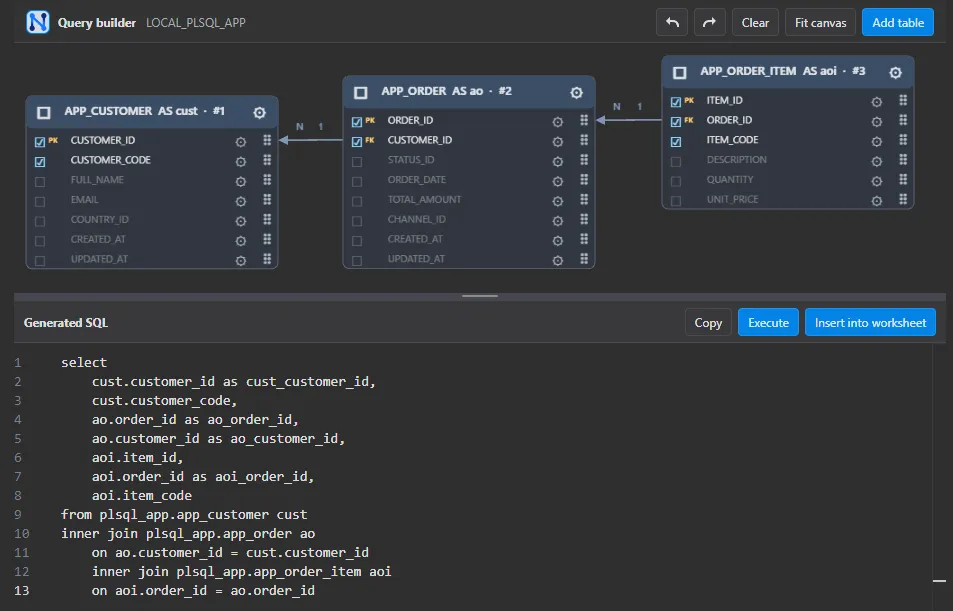
Query Builder gives Oracle developers a visual starting point for SELECT statements while keeping the generated SQL visible and editable. It is useful when you know the result you need but want to explore the schema relationships before writing every clause by hand.
Start with the tables you want to inspect, choose the columns, and add joins, filters, grouping, and sorting as the query takes shape. The builder keeps those choices organized and produces ordinary Oracle SQL that you can send to a worksheet for review, parameter changes, execution, or further editing. This makes the visual flow a companion to SQL rather than a separate format: you can move from a quick relationship sketch to code you own. Query Builder is especially helpful for discovery work, onboarding, and queries where several joins or optional conditions make the first draft harder to visualize.
Explore relationships visually
Choose tables and columns first, then add joins, filters, grouping, and sorting as the result takes shape. Query Builder gives you a clear view of the relationships behind the query while keeping each choice close to the generated statement. You can drag tables directly from the Connections tree into the builder, moving from schema browsing to a visual query without re-entering object names. It also automatically generates table aliases and disambiguating aliases for repeated column names across multiple tables, while still letting you provide custom aliases when you want exact control over the SQL.
Move from a visual draft to SQL you own
The output is ordinary Oracle SQL. Send it to a worksheet, review or edit the clauses, add parameters, and run it through the same Nexo SQL Studio workflow you already use for hand-written queries. The builder helps with the first draft without locking the result into a separate format.
Useful for discovery and onboarding
Query Builder is a practical companion when you are learning an unfamiliar schema, checking a multi-join idea, or helping a teammate understand how a result is assembled. Start visually, then keep the SQL, review history, and execution context in the editor.