
SQL Load Tester in VS Code
Use SQL Load Tester to turn a SQL statement into a repeatable Oracle workload with clear controls for concurrency, pacing, duration, and results.
SQL Load Tester brings a focused workload loop into Nexo SQL Studio. Instead of building a one-off script whenever you need to understand how a statement behaves under pressure, you can keep the SQL close to the connection and run it with repeatable controls.
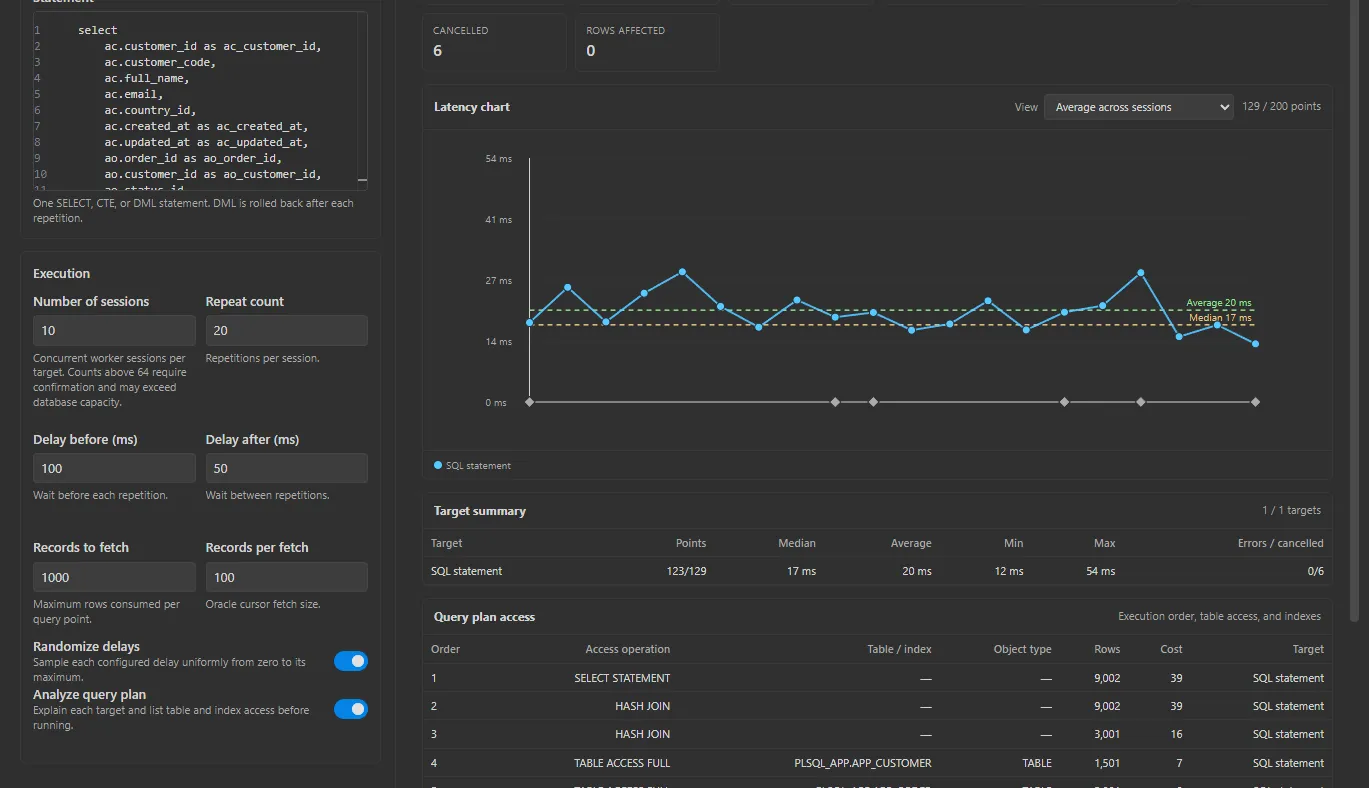
Choose the Oracle connection, configure the number of concurrent workers, set the duration or iteration target, and adjust pacing when you want to avoid an artificial burst. The run view keeps the important signals together: completed executions, failures, elapsed time, throughput, and response-time summaries. It is a practical way to compare a query revision, check a connection pool change, or create a baseline before a larger rollout. Load Tester gives database developers a consistent first pass without leaving VS Code. Save the SQL in your workspace, repeat the same settings, and share the resulting evidence with the team.
Build a workload you can repeat
Load testing is most useful when the setup is stable enough to compare. SQL Load Tester keeps the statement, connection, worker count, pacing, and run duration in one focused workflow so a second run can answer the same question as the first.
Read the run without leaving VS Code
During a run, follow completed executions, failures, elapsed time, throughput, and response-time summaries. These signals make it easier to spot a query that scales poorly, a connection that is struggling, or a change that improved the baseline.